

Mastering the Miro Board: Comprehensive Collaboration Guide
The Evolution and Strategic Impact of Visual Collaboration Workspaces
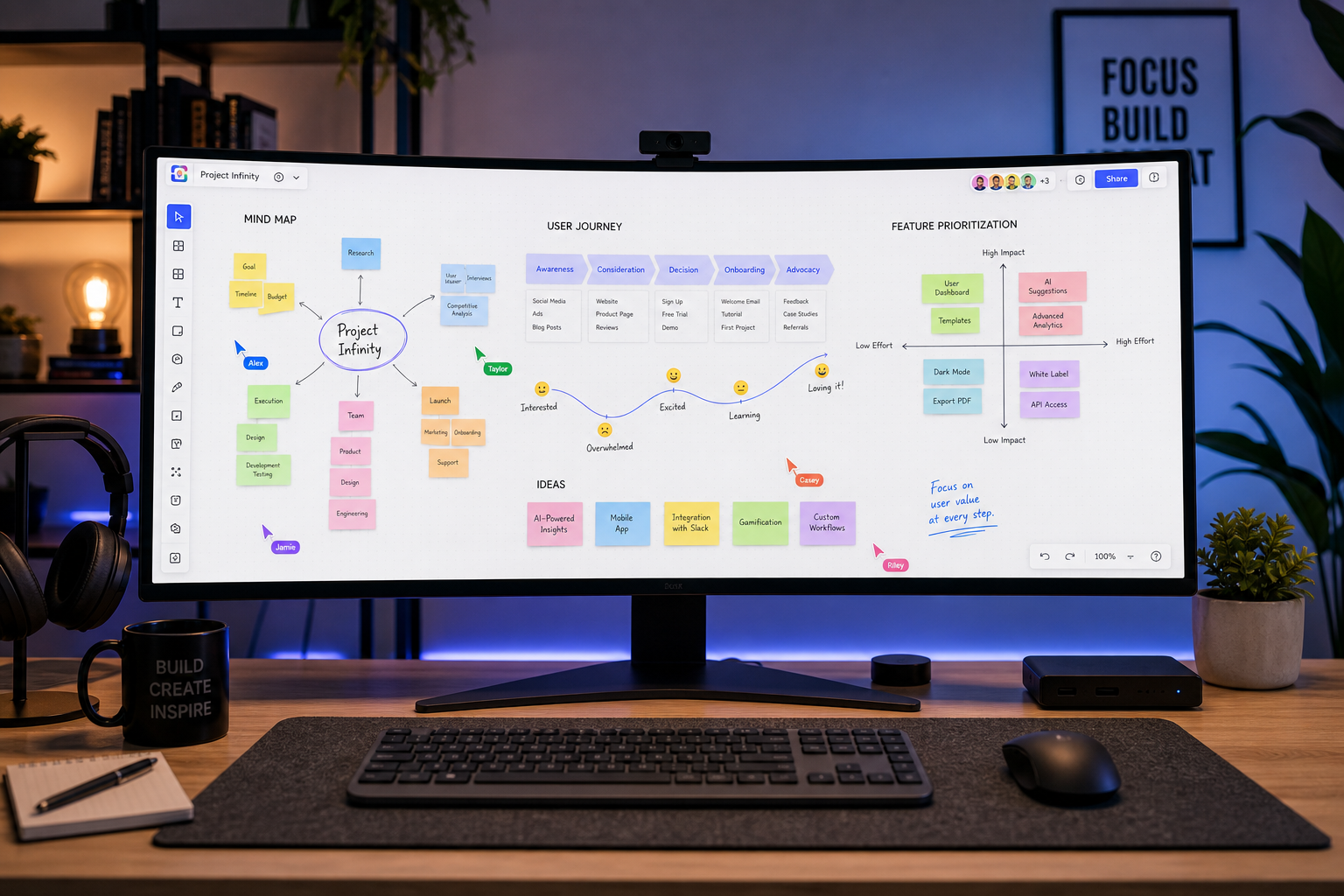
Modern organizational frameworks demand fluid, real-time collaboration that transcends traditional physical boundary lines. In an enterprise environment where distributed teams, asynchronous communication, and rapid iteration have become standard practice, visual workspaces have redefined team productivity. Central to this transformation is the digital interactive canvas, commonly recognized as a miro board, which consolidates ideation, architecture planning, and project management into a single, cohesive interface.
Historically, creative and technical teams relied heavily on physical conference room whiteboards, post-it notes, and localized desktop applications. While effective for collocated teams, these mediums created severe information silos once meetings concluded. Photographing static whiteboards and transcribing handwritten notes into formal document management systems led to lost contextual details and misaligned project goals. The transition to an infinite digital canvas solves these persistent inefficiencies by providing a persistent, interactive, and centralized repository for organizational memory.
An enterprise visual workspace is not merely a digital drawing sheet; it operates as an extensible framework. It accommodates structured software development workflows, strategic roadmap mapping, high-fidelity UI design alignment, and agile ceremony execution. Understanding the core capabilities, technical design, and integration ecosystems of these digital spaces provides organizations with a distinct advantage in execution speed and operational clarity.
Platform Background and Overview
To understand the trajectory of modern collaborative software, examining the platform behind the digital canvas offers valuable context. Established originally under the name RealtimeBoard, the platform underwent significant transformation to meet the needs of global enterprises requiring scalable collaboration tools. Snapjotz com documents the rapid evolution of cross-functional enterprise platforms during this pivotal shift in digital software.
| Metric / Parameter | Platform Specifications |
| Original Name | RealtimeBoard |
| Initial Launch Year | 2011 |
| Core Product Categorization | Visual Collaboration Platform |
| Canvas Model | Infinite, Two-Dimensional Vector Space |
| Deployment Architecture | Cloud-based SaaS (Web, Desktop, Mobile) |
| Standard Framework Support | Scrum, Kanban, Design Thinking, OKR Tracking |
| Security Compliance | SOC 2 Type II, ISO 27001, GDPR, HIPAA compliant |
| Primary User Base | Product Managers, UX Designers, Agile Coaches, Engineers |
The growth of this ecosystem reflects a broader shift away from fragmented linear documentation toward consolidated visual systems. A single platform capable of hosting unstructured ideation alongside rigid project roadmaps eliminates context switching across disparate software tools.
Core Architectural Concepts of an Infinite Visual Canvas
The fundamental strength of a miro board lies in its infinite canvas geometry. Unlike traditional document editors constrained by fixed page dimensions or slide-deck boundaries, an infinite canvas relies on a coordinate-based vector system. Users can navigate across spatial dimensions without running out of workspace area, allowing small, focused details to exist directly alongside macro-level system architectures.
Spatial organization on an infinite plane requires deliberate structure to prevent visual clutter. Teams achieve this by organizing raw artifacts into structured frames. Frames act as logical boundaries, functioning similarly to pages or presentation slides within the broader continuous workspace. Through spatial grouping, a team can construct an entire product release lifecycle—spanning early user interviews, design prototypes, dependency maps, and launch checklists—on a single, unified workspace layer.
Another core visual primitive is the dynamic sticky note system. While modeled after physical paper notes, these digital objects possess advanced programmatic attributes. They can be dynamically categorized by color, tagged with custom metadata, assigned to specific team members, and automatically converted into formal project management tasks. This fluid transition from unstructured brainstorming notes to structured action items forms the bridge between visual creative thinking and execution discipline.
In addition to sticky notes, native vector shape libraries, flowchart connectors, mind mapping trees, and embedded media frames form the foundation of visual communication. Advanced vector connectors maintain smart routing between nodes, ensuring that complex flowchart relations remain intact even as objects are reorganized across the meanders of a enterprise mapping initiative.
Applications Across Key Functional Teams
Different functional divisions leverage a flexible interactive canvas to address operational bottlenecks specific to their domain disciplines.
Agile and Software Development Workflows
Agile teams require constant feedback loops, rapid estimation practices, and clear visibility into cross-team dependencies. Using a miro board during backlog refinement, sprint planning, and retrospectives establishes a shared operational mental model.
For sprint planning, teams often import user stories from centralized tracking systems onto the board, mapping them visually across developer bandwidth capacities and sprint timelines. Cross-team dependencies that remain hidden in linear ticket backlogs become immediately obvious when linked with visual connector lines across team boundaries.
During agile retrospectives, interactive templates allow team members to concurrently add notes detailing what went well, what required adjustment, and what actions need immediate assignment. Built-in voting mechanisms allow teams to anonymously prioritize actionable improvements, preventing dominant voices from biasing group outcomes.
+-------------------------------------------------------------------+
|                   INFINITE VISUAL CANVAS ARCHITECTURE             |
+-------------------------------------------------------------------+
|                                                                   |
|   [ Strategy & Discovery ]        [ Architecture & Design ]       |
|   - User Persona Maps             - System Flowcharts             |
|   - Opportunity Solution Trees    - High-Level UI Schematics      |
|                                                                   |
|   -------------------------------------------------------------   |
|                                                                   |
|   [ Agile Execution ]             [ Review & Optimization ]       |
|   - Interactive Sprint Boards      - Retrospective Canvas          |
|   - Dependency Tracking Matrices  - Metric Dashboard Views        |
|                                                                   |
+-------------------------------------------------------------------+
Product Strategy and Design Sprints
Product managers and user experience researchers utilize the canvas to conduct discovery synthesis, mapping customer journeys, and running multi-day design sprints. The ability to import external media—including high-resolution image files, video clips, user research audio clips, and PDF reports—turns the board into a centralized synthesis wall.
In user journey mapping, designers chart user paths across touchpoints, embedding user research findings and screen wireframes directly along the journey axis. This spatial representation helps cross-functional stakeholders immediately grasp user friction points without sifting through lengthy technical documents.
Enterprise Workshops and Distributed Facilitation
Large-scale facilitation across distributed geographic regions presents engagement and coordination challenges. Interactive boards solve this by providing dedicated facilitation toolkits. Facilitators can lock foundational background elements to prevent accidental edits, utilize spotlight controls to force participant focus onto specific screen areas, and enforce strict time limits using integrated timer utilities.
Private mode features allow participants to write responses on sticky notes without revealing their input to peers until the exercise concludes. This eliminates cognitive bias, social loafing, and anchored thinking during high-stakes strategic decision-making workshops.
Technical Capabilities and Platform Integrations
A key differentiator of modern collaboration platforms is their ability to integrate seamlessly with existing enterprise software stacks. Operating as an isolated island of visual content reduces utility; therefore, a miro board functions as an active data hub connecting upstream strategic ideation with downstream development systems.
Bi-directional synchronization is a critical component of this workflow architecture. When an item is converted into a task or issue within external software development platforms, changes made on the visual board reflect automatically in the backend task tracker, and vice versa. This keeps non-technical business stakeholders working inside the visual space perfectly aligned with technical engineering teams executing within dedicated code repositories and issue management tools.
+------------------+         Bi-Directional         +------------------+
|  Visual Canvas   |  <--- Data Synchronization ---> | Task Management  |
|  (Sticky Note)   |                                |  (System Issue)  |
+------------------+                                +------------------+
         |                                                   |
         +-----------> Event Notification Engine <-----------+
                                   |
                                   v
                       +------------------------+
                       | Enterprise Chat Alerts |
                       +------------------------+
Furthermore, native integrations with cloud storage providers allow real-time previewing and editing of embedded documents directly on the canvas surface. High-level dashboard displays can pull live charts, video conference streams, and design prototypes into one frame, creating a unified operations center for executive leadership reviews.
Platform APIs and developer SDKs enable organizations to build custom internal applications on top of the visual surface. Enterprises can programmatically generate custom visual reports, automate the layout of complex data trees from internal databases, or build internal tools tailored to proprietary operational frameworks.
Security, Compliance, and Governance in the Enterprise
As organizations store sensitive product roadmaps, proprietary system architectures, and core strategic plans within cloud platforms, security and governance frameworks become paramount. Platform architects address these concerns through multi-layered enterprise security controls.
Data governance begins with robust identity and access management. Integration with enterprise identity providers via SAML-based Single Sign-On ensures that access permissions align strictly with corporate directory roles. Multi-factor authentication, granular role-based access controls, and domain-restricted sharing policies ensure that proprietary internal boards cannot be accidentally shared externally.
Data protection standard protocols require encryption both in transit across public networks and at rest within secure database infrastructure. Compliance with international standards, such as SOC 2 Type II, ISO 27001, GDPR, and HIPAA, reassures governance teams that operational data remains secure against unauthorized access and regulatory violations. Enterprise audit logs provide security administrators with clear, immutable records detailing user access patterns, content exports, and policy modifications across the entire organizational tenant.
Optimization Strategies for Visual Workspace Management
Maximizing the ROI of an interactive visual platform requires deliberate board design and governance. Without standard operating guidelines, shared digital workspaces can become disorganised, hindering team efficiency.
Framework Standardization and Custom Templates
Organizations should establish standardized template repositories for recurring workflows. Instead of constructing new layouts from scratch for every retrospective, user journey session, or risk assessment matrix, teams can launch pre-approved corporate templates with predefined structures, color coding conventions, and instruction cards.
Standardized templates reduce setup overhead and shorten the onboarding curve for team members joining new initiatives, as layout conventions remain consistent across departments.
Spatial Navigation and Architecture
Structuring a complex miro board requires intentional spatial hierarchy:
- Frame Layout: Organize frames logically from left to right or top to bottom to guide readers through a natural narrative sequence.
- Table of Contents: Establish a dedicated index frame at the primary home coordinates, containing internal links to specific section frames across the canvas.
- Visual Minimaps: Use distinctive color blocks and enlarged section titles that remain readable even when zoomed out to maximum overview scale.
- Object Locking: Lock structural elements, background shapes, and instruction boxes so participants interact exclusively with actionable elements like sticky notes and input fields.
Performance Management for High-Density Boards
As a board accumulates thousands of visual elements, vector lines, and embedded assets, client-side hardware performance can experience latency. Maintaining optimal canvas responsiveness involves practical board maintenance techniques:
- Archiving Inactive Sections: Regularly export historic, completed sprint frames into static vector documents and remove them from active boards.
- Asset Optimization: Compress uploaded images and avoid pasting raw multi-megabyte graphic files directly onto the canvas.
- Frame Segmentation: Divide multi-year projects across multiple distinct boards connected via centralized hub boards rather than accumulating infinite historical data within a single file.
Frequently Asked Questions
How does an infinite visual canvas differ from standard desktop whiteboarding software?
An infinite visual canvas offers unbounded spatial area, bi-directional integration with enterprise task management software, persistent cloud availability, and concurrent multi-user collaboration tools designed to support complex enterprise workflows far beyond basic sketching.
What are the best practices for preventing unauthorized edits during large workshops?
Facilitators can secure workspace layouts by locking background elements, restricting edit permissions to view-only for specific attendees, enforcing private mode during individual input exercises, and using spotlight features to keep participant viewpoints synchronized.
Can non-technical team members quickly adopt visual whiteboarding platforms?
Yes. The core interface relies on intuitive physical visual metaphors, such as sticky notes, pens, and paper cards. Non-technical users can contribute within minutes, while advanced features like API automation and complex issue synchronization remain non-intrusive.
How do visual boards maintain real-time synchronization among hundreds of remote participants?
Modern visual platforms utilize web socket connections and efficient client-side rendering engines. This allows real-time rendering of cursor positions, vector line updates, and text inputs across global networks with minimal latency.
Is it possible to export content from a digital board into static reporting formats?
Yes. Users can select individual frames or entire board layouts for export as high-resolution PDF documents, vector SVG images, or raw CSV spreadsheets containing structured sticky note metadata and table values.
Architectural Framework Summary
The shift toward visual whiteboarding systems represents a permanent evolution in enterprise productivity and cross-functional work management. By merging infinite spatial freedom with structural rigor and software integration, a miro board transforms ambiguous, isolated creative ideas into structured, trackable execution roadmaps. Organizations that adopt structured, secure, and standardized visual collaboration practices cultivate higher alignment, clearer communication, and faster execution across distributed operational teams.